I think DXGI/EnumDisplayDevices (DedicatedVideoMemory/HardwareInformation.qwMemorySize) with help of the registry is still the best way of retrieving this value even if it is incorrect simply because I don't think the real value can be obtained at least from user mode from what I know. You need kernel level access to get the correct value or another program that has kernel access and has stored this information elsewhere. I say this because DirectX, OpenCL, OpenGL and Vulkan all return the same incorrect value and all of them operate at user mode.
An example of this is with system memory (RAM), if you use GlobalMemoryStatusEx (_MEMORYSTATUSEX.ullTotalPhys), you get less memory than the actual value however, there's another function GetPhysicallyInstalledSystemMemory, this one gives you the correct value at user mode, however this function uses SMBIOS to get this value, and SMBIOS itself retrieves information at kernel level on system startup.
This is why when you use GetPhysicallyInstalledSystemMemory under virtual machine, you get an error because some virtual machines do not generate SMBIOS properly.
Three solutions:
1. First solution is to roundup.
Use this roundup function to convert values that are close to the actual value.
GPU VRAM detected as 8046 MB gets converted to 8192 MB.
Rounding up works because VRAM hardware reservations are only a few MBs, this would not work for system memory because of iGPU memory allocation in the bios which would eat several GBs etc...
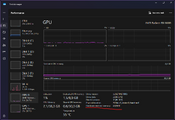
2. The second solution is to reverse engineer task manager or find out where task manager retrieves this value from
Посмотреть вложение 10353
Because if you add the value you find from DXGI DedicatedVideoMemory with this one, you get the real/correct value.
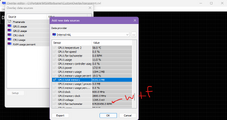
3. Build a driver that can access this information or use another program/library that can dump the information
Посмотреть вложение 10354