

BLACKFIRE69
Новичок
PerfProf and CmdTimer - High-Precision Performance Profiling Suite
================================================================
Overview:
A dual-purpose monitoring suite designed for measuring the resource impact of code execution. Whether you need to benchmark Inno Setup scripts with the lightweight 'PerfProf' DLL or profile any command-line process with 'CmdTimer', this suite provides millisecond and microsecond precision metrics on CPU, memory, I/O, and more.
Both tools are written in Nim for minimal overhead and high-precision system calls, ensuring that the act of measuring has a negligible footprint on the results.
Specifications:
• Version : v1.0
• Author : BLACKFIRE69
• Language : Nim (v2.2.8)
• License : Proprietary (See LICENSE file for details)
• Compatibility : Inno Setup v6.x+
Distribution Files:
PerfProfiler_{lib}.dll — Core API Libraries for Inno Setup
PerfProfiler.iss — Header for Inno Setup integration
Example_PerformanceTest.iss — Benchmarking template
CmdTimer_{lib}.exe — Standalone CLI profiler
CmdTimer_Example.bat — Batch example for CLI benchmarking
---
1. PerfProf: The Inno Setup DLL
Overview:
PerfProf (Performance Profiler) is a lightweight library designed to measure the resource impact of code within Inno Setup. It provides detailed metrics allowing developers to benchmark their setup logic, custom DLLs, or external process interactions.
Key Features:
• High-Precision Timing: Capture execution time in both milliseconds and microseconds for ultra-fine benchmarking
• CPU Monitoring: Detailed breakdown of CPU usage (%), Kernel Time, User Time, and Total CPU Time
• Memory Tracking: Monitor Pagefile usage, Working Set size, Peak Memory consumption, and Page Faults
• I/O Analysis: Track I/O Read/Write operations and total bytes transferred
• Simple API: Direct Start/Stop/Reset workflow with automated formatted reporting in the Inno Setup {Code} section
Available Builds:
PerfProfiler_clang.dll
Size: 68 KB
PerfProfiler_gcc.dll
Size: 120 KB
PerfProfiler_msvc.dll
Size: 135 KB
---
2. CmdTimer: The Advanced CLI Profiler
Overview:
CmdTimer is the standalone console version, offering advanced capabilities for command-line benchmarking and automated performance testing.
Key Features:
• Multiple Runs & Statistics: Execute a command N times to automatically calculate min, max, average, and standard deviation
• Process Tree Tracking: Captures metrics for both the main process and all its child processes (via Job Completion Ports)
• Flexible Output: Supports Default (ANSI colors), Plain (no colors), JSON, CSV, or Quiet (only time) formats for easy parsing
• Resource-Rich Reporting: Includes CPU usage, peak memory, I/O operations, and page faults for any CLI tool or batch script
• Portable & Lightweight: Single executable with no external dependencies
Available Builds:
CmdTimer_clang.exe
Size: 108 KB
CmdTimer_gcc.exe
Size: 137 KB
CmdTimer_msvc.exe
Size: 174 KB
---
Quick Start Examples
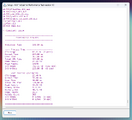
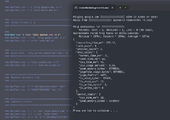
Inno Setup (PerfProf) Example:
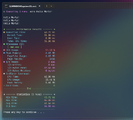
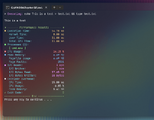
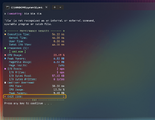
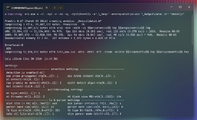
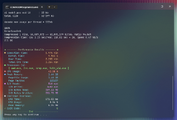
Command Line (CmdTimer) Examples:
================================================================
Overview:
A dual-purpose monitoring suite designed for measuring the resource impact of code execution. Whether you need to benchmark Inno Setup scripts with the lightweight 'PerfProf' DLL or profile any command-line process with 'CmdTimer', this suite provides millisecond and microsecond precision metrics on CPU, memory, I/O, and more.
Both tools are written in Nim for minimal overhead and high-precision system calls, ensuring that the act of measuring has a negligible footprint on the results.
Specifications:
• Version : v1.0
• Author : BLACKFIRE69
• Language : Nim (v2.2.8)
• License : Proprietary (See LICENSE file for details)
• Compatibility : Inno Setup v6.x+
Distribution Files:
PerfProfiler_{lib}.dll — Core API Libraries for Inno Setup
PerfProfiler.iss — Header for Inno Setup integration
Example_PerformanceTest.iss — Benchmarking template
CmdTimer_{lib}.exe — Standalone CLI profiler
CmdTimer_Example.bat — Batch example for CLI benchmarking
---
1. PerfProf: The Inno Setup DLL
Overview:
PerfProf (Performance Profiler) is a lightweight library designed to measure the resource impact of code within Inno Setup. It provides detailed metrics allowing developers to benchmark their setup logic, custom DLLs, or external process interactions.
Key Features:
• High-Precision Timing: Capture execution time in both milliseconds and microseconds for ultra-fine benchmarking
• CPU Monitoring: Detailed breakdown of CPU usage (%), Kernel Time, User Time, and Total CPU Time
• Memory Tracking: Monitor Pagefile usage, Working Set size, Peak Memory consumption, and Page Faults
• I/O Analysis: Track I/O Read/Write operations and total bytes transferred
• Simple API: Direct Start/Stop/Reset workflow with automated formatted reporting in the Inno Setup {Code} section
Available Builds:
PerfProfiler_clang.dll
Size: 68 KB
PerfProfiler_gcc.dll
Size: 120 KB
PerfProfiler_msvc.dll
Size: 135 KB
---
2. CmdTimer: The Advanced CLI Profiler
Overview:
CmdTimer is the standalone console version, offering advanced capabilities for command-line benchmarking and automated performance testing.
Key Features:
• Multiple Runs & Statistics: Execute a command N times to automatically calculate min, max, average, and standard deviation
• Process Tree Tracking: Captures metrics for both the main process and all its child processes (via Job Completion Ports)
• Flexible Output: Supports Default (ANSI colors), Plain (no colors), JSON, CSV, or Quiet (only time) formats for easy parsing
• Resource-Rich Reporting: Includes CPU usage, peak memory, I/O operations, and page faults for any CLI tool or batch script
• Portable & Lightweight: Single executable with no external dependencies
Available Builds:
CmdTimer_clang.exe
Size: 108 KB
CmdTimer_gcc.exe
Size: 137 KB
CmdTimer_msvc.exe
Size: 174 KB
---
Quick Start Examples
Inno Setup (PerfProf) Example:
Форматирование (BB-код):
{Code}
#define lib = "clang"
#include "PerfProfiler.iss"

procedure RunPerformanceTest();
begin
  StartMeasurement;
  DoSomeHeavyLifting();
  StopMeasurement;

  LogMm.Lines.Add(' Performance Results');
  LogMm.Lines.Add(' ========================================');
  LogMm.Lines.Add('');
  LogMm.Lines.Add(Format(' %-22s %s', ['Execution Time', FormatTimeStr(ExecutionTime)]));

  // -- Process Tree --
  LogMm.Lines.Add(' ---- Process Tree ----------------------');
  LogMm.Lines.Add(Format(' %-22s %.2f %% (%d proc)', ['CPU Usage', TreeCpuUsage, ProcessCount]));
  LogMm.Lines.Add(Format(' %-22s %s', ['Kernel Time', FormatTimeStr(TreeKernelTime)]));
  LogMm.Lines.Add(Format(' %-22s %s', ['User Time', FormatTimeStr(TreeUserTime)]));
  LogMm.Lines.Add(Format(' %-22s %s', ['Total CPU Time', FormatTimeStr(TreeTotalCpuTime)]));
  LogMm.Lines.Add(Format(' %-22s %s', ['Peak Memory', FormatBytesStr(TreePeakMemory)]));
  LogMm.Lines.Add(Format(' %-22s %d', ['Page Faults', TreePageFaults]));
  LogMm.Lines.Add(Format(' %-22s %s (%d ops)', ['I/O Reads', FormatBytesStr(TreeIOReadBytes), TreeIOReadOps]));
  LogMm.Lines.Add(Format(' %-22s %s (%d ops)', ['I/O Writes', FormatBytesStr(TreeIOWriteBytes), TreeIOWriteOps]));

  // OR
  Log(GetFormattedReport);

  ResetMeasurement;
end;
Command Line (CmdTimer) Examples:
Форматирование (BB-код):
# Simple timing of a command
> CmdTimer.exe "dir /s"

# Run 10 times and get statistics (CSV output)
> CmdTimer.exe -c 10 -o csv "benchmark_app.exe --mode fast"

# Profile with a specific working directory
> CmdTimer.exe -d "C:\Project" "build.bat"